Free for Windows and Android

Start a video on your PC, finish it on your phone

Tap your phone on a little NFC sticker, or press Open on phone in the app, and the YouTube video playing in Chrome carries on in the YouTube app, right where you were.

Download for WindowsGet the Android beta

It works over your own Wi-Fi, with no account to make. NFC tags are optional.
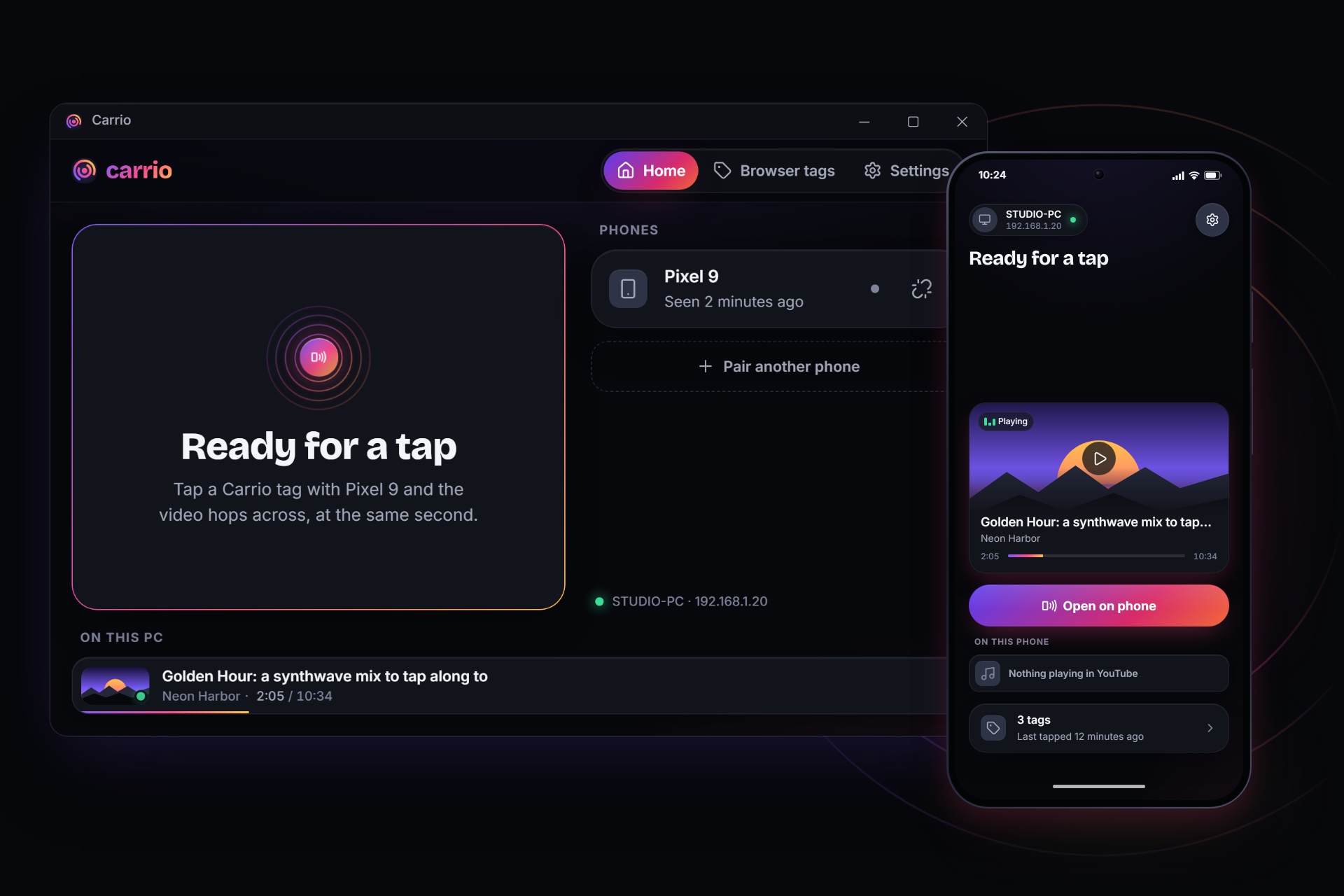
The Windows app and the phone app side by side, showing the same video: it plays on the PC, and the phone offers Open on phone

Why I built this

I'm often watching a YouTube video or working on something, and then I go for a coffee break or get pulled away. I always wished I could just carry on with whatever I was doing or watching on my phone, without having to look it up again, find my spot, or copy URLs around.

I wanted to just tap something, or pick up my phone, and have it there. That's why Carrio exists.

How it works

You set it up once. After that it's one tap, or one button if you don't have tags.

  1. Install it on bothCarrio for Windows sits in your tray. The Android app is a free beta that you install straight from this site for now.
  2. Scan the QR codeOpen Carrio on your PC and the QR code is already there, waiting. Scan it with the app and you're paired. If your camera's being difficult, you can type in the PC address and 6-digit code it shows instead.
  3. Tap a tag, or press a buttonThe YouTube video moves to the other screen, and the one you left pauses itself.

And that's it. Go grab a coffee ☕

The Windows app ready to pair: a QR code inside a countdown ring, three short steps, the PC address and a 6-digit codePairing: the phone's camera view lined up on the QR code shown on the PC, with Type the code instead underneath

What Carrio can move

PC to phone

A YouTube video in Chrome on your PC opens in the YouTube app on your phone, at the same spot. Your PC pauses.

Phone to PC

A video in the YouTube app on your phone opens in Chrome on your PC, and your phone pauses. It needs one permission on the phone, and the app walks you through it.

Current tab

Put this on a tag and it sends whatever page is in Chrome's front tab to your phone. If that page is a YouTube video, the time comes along too.

Smart tags

One tag for both ways. It looks at what's playing where and works out which way to send it. If it really can't tell, your phone just asks you.

You don't actually need NFC tags

Moving a YouTube video either way is a button in the app: Open on phone, Open on PC, or just tap the video's card. The tags turn it into one tap without even opening the app, and honestly, they're the fun part.

With a tag

Wake your phone, tap it on the sticker, and you're done. This works for YouTube, Current tab and Smart.

Without a tag

Open Carrio and press Open on phone or Open on PC. This works for YouTube, both ways.

My tags on the phone: Desk (PC to phone), Sofa (phone to PC) and Smart YouTube, each with when it was last used, and a Write a new tag button

What are NFC tags?

An NFC tag is a little sticker, card or key ring with a tiny chip and an antenna inside. There's no battery: your phone powers it for the moment you tap, so it keeps working for years. Carrio writes an action onto it with your phone, and you can rewrite it whenever you change your mind.

You don't need anything special to get them. Search for NTAG215 stickers on Amazon, Takealot, AliExpress or wherever you like to shop. On Amazon, a pack of 30 to 60 costs about $5 to $10 (October 2026), so each tag costs cents.

What NFC tags look like, and what is inside oneA round NFC sticker 25 mm across, a card the size of a bank card (86 × 54 mm) and a key ring tag about 4 cm long, drawn side by side, roughly to scale. Below them, a sticker is magnified to show what's inside: a tiny chip, and a coil of thin foil around the edge that works as its antenna. There's no battery, because your phone powers the tag when you tap it.Roughly to scaleCard86 × 54 mmSticker25 mmKey ringabout 4 cmInside a stickerAntennaa coil of thin foilTiny chipholds the linkNo batteryyour phone powers it

It stays on your home network

Your phone talks straight to your PC over your own network. There's no account to make and no server in the middle. Pairing is a QR code, and either side can unpair whenever you like.

Carrio only goes online for the obvious stuff: opening YouTube, loading video thumbnails, and looking a video up on YouTube by its title and channel when your PC hasn't seen it before.

The notification access screen: it reads only the YouTube apps (title, channel and position), sends it to your PC on a tap, and has an Allow in Settings button

What it doesn't do (yet)

I'd rather you know this now than find out after installing.

  • It's Windows and Android for now. No Mac or iPhone yet.
  • On the PC it works with Chrome, and it reads the tab at the front. If your video's in a background tab, Carrio will ask you to bring it forward.
  • Your phone and PC need to be on the same home network. It won't work over mobile data.
  • Phone to PC needs notification access on the phone, so Carrio can see what YouTube is playing. PC to phone doesn't need it.
  • Going from phone to PC, YouTube's app only tells other apps the title and channel, not which video it is. Your PC remembers the videos you've handed off, so going back and forth works. For a new one it searches YouTube, and if it can't be sure, it shows you the results to pick from.
  • Current tab and Smart live on tags for now. The buttons in the app do YouTube.
  • The Android app is a beta you install from this site (an APK file), so Android will ask you to allow the install. The Play Store comes later.
Coming soon

Next up: a soundboard you tap

This one's still being built, so I won't oversell it. The idea is a printed sheet of tiles with an NFC sticker behind each one. Give every tile a sound from your PC, tap your phone on it, and the sound plays. With a free virtual audio cable, your friends in a Discord call will hear it too.

Made by one developer

It's just me working on this, not a company, and it's free. If something doesn't work on your phone, or you've got an idea for what a tag should do next, I'd really like to hear about it.

Quick questions

Do I need NFC tags?

No. Moving a YouTube video either way is a button in the app: Open on phone, Open on PC, or tap the video's card. Tags make it one tap without opening the app first, and a couple of things live on tags for now, like Current tab and Smart. I'd grab a pack, but you can try the main thing without one.

Is it free?

Yes. Both apps are free to download and use, and there's no account to make.

Does it work on iPhone or Mac?

Not yet. I'm getting Windows and Android right first. iPhone is on the list for later, but there's no date yet.

Does Carrio need the internet?

The handoff itself happens on your home network. YouTube needs the internet, of course. Carrio also uses it to load video thumbnails and, when your PC hasn't seen a video before, to look it up on YouTube by its title and channel.

Is anything sent to a server?

Not to mine, because there isn't one. Your phone and PC talk directly on your home network. The only things that go online are YouTube itself, video thumbnails, and that title-and-channel lookup on YouTube. The privacy page has the full list, including what this website counts.

Give it a go

It's free, setup takes a couple of minutes, and you don't need any tags to try it.

Download for WindowsGet the Android beta

Stuck on something? The help page covers the usual bumps.